Same locker. But you.
End of Watch AI video generator: you at the lockers
Take the main role in a locker-room clip that moves from a tight masked close-up to props held toward the lens. Your photo brings your appearance and outfit into the scene.
Example video by @starscreambf6 on TikTok
What you get
Your role in the scene
Your appearance and clothing take the main character's place across the locker-room shots.
What changes
- The main character's appearance and outfit come from your photo.
What stays
- The lockers, skull-masked figure, prop gestures, flash, camera movement and lighting.
Sound
The clip's vocal track stays with the same timing; the song is not identified.
How to make it
Add your photo
Add one clear, front-facing photo wearing the outfit you want in the scene.
Pick the quality
720p for posting, 480p for a quick test at about half the credits.
Download and post
In about 6 minutes: a 1:1 MP4, plus a free 9:16 version for TikTok and Reels.
The meme
About End of Watch Locker Scene
What happens at the lockers
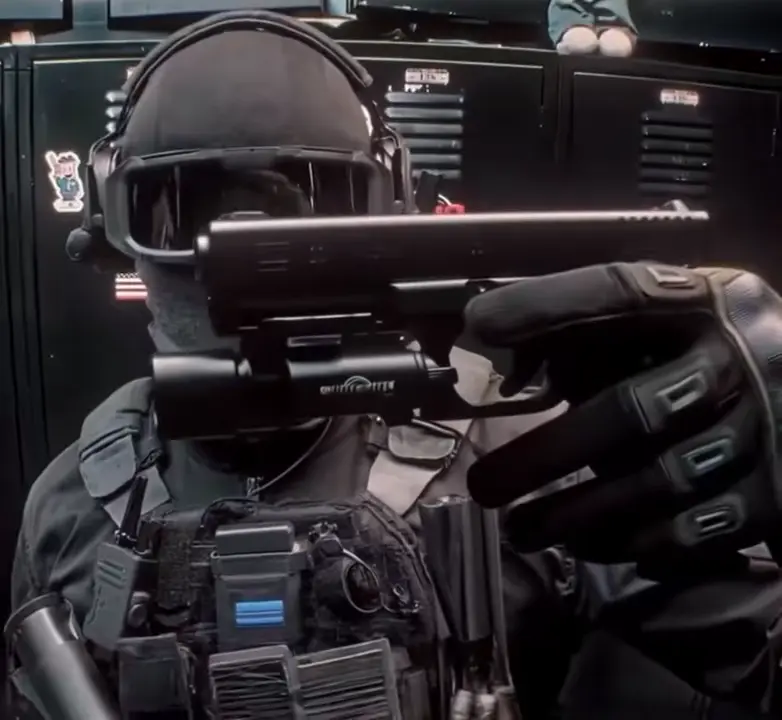
The clip opens close to a character wearing dark goggles, a face covering and a headset in front of sticker-covered lockers. A skull-masked figure appears beside them before a quick camera move and a bright flash. The main character then raises props toward the lens, holds up two dark containers and finishes by lifting a spray can. You replace that main character throughout the sequence.
Where this version appeared
@starscreambf6 posted this locker-room version on TikTok on November 3, 2026; the post has 1.2 million plays. Its title mentions the ‘24 trend’ and calls this the End of Watch version. The earliest creator and the source of the underlying footage are unknown.
@starscreambf6 on TikTokWhat you get
A square 1:1 MP4 of about 12 seconds: 185 credits at 720p or 85 at 480p, usually ready in about 6 minutes. It keeps the clip's original sound.
Choose a clear, uncovered face
Although the clip opens with tactical face coverings, your upload should show your face clearly.
- Use one photo containing one person, with the face close and front-on.
- Choose even lighting, no sunglasses and nothing covering the face.
- Wear the outfit you want to appear in throughout the locker-room sequence.
- Use your own photo or an adult's photo with their agreement; never use a minor, celebrity or public figure.
- Label the locker-room video as AI-generated when you post it.
Photos of celebrities, public figures or minors are declined. No nudity.
More memes
See allFAQ
End of Watch Locker Scene questions
Do I replace the skull-masked figure too?
You replace only the main character who faces the camera and handles the props. The skull-masked figure beside them stays in the scene.
How many photos does this locker scene need?
One photo of one person. A close, front-facing view with an uncovered face gives the template a clear view of your features.
Will I wear the tactical outfit?
The clothes in your photo become your outfit throughout the clip. Choose your upload with the locker-room close-ups in mind.
Does the vocal track stay?
Yes. The clip keeps its sound and vocal timing. The song's name is unknown.
Is this verified footage from the End of Watch film?
The TikTok post calls this an End of Watch version, but its connection to actual film footage is unverified.
Can I put someone else in the locker scene?
Only use another adult's photo if they agreed. Photos of minors, celebrities and public figures are not allowed, and you should label the result as AI-generated when sharing it.